
Pixel-Perfect Dynamic Text
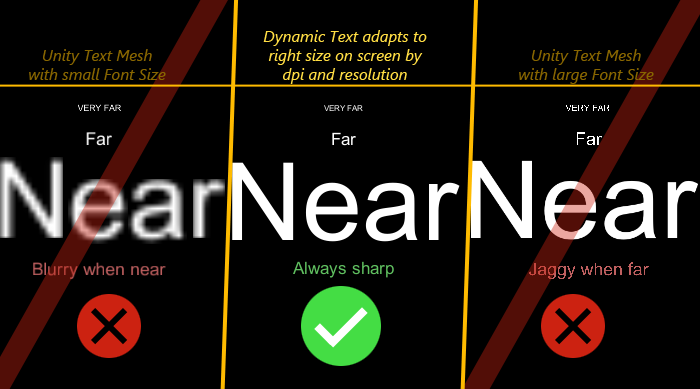
A component for displaying sharp, camera-facing text in world space. Size & position are proportional to world units, automatically choosing optimal font sizes for maximum legibility.
Interactive WebGL Demo
Experience how the text adjusts sharply and maintains pixel perfection as the window is resized.
Key Features
World Space Alignment
- Text size is proportional to world units, independent of pixel DPI.
- Always sharp, whether near or far from the camera.
- Supports both orthogonal and perspective cameras.
- Does not need a Canvas
Snapping & Anchors
- Sub-pixel drift prevention with optional pixel snapping.
- Horizontal row alignment.
- 12-point anchoring.
- Baseline, ascent, and descent font metrics.
Optimized Performance
- Regenerates meshes only when properties or content change.
- No native code - high portability.
- Works with Desktop, Mobile and Web.
What is this a solution for?
Some common issues when you work with text in game engines.
Example 1:
What can happen if you design for small screen (lo-res phone) first and then move over to larger screen (hi-res/hi-dpi desktop or tablet).
|
Starting point: For example, handcrafted layout for LO-RES phone. 
|
→ |
If you worked with absolute pixel sizes... The same pixels represent only a tiny portion of the larger screen and text is illegible. 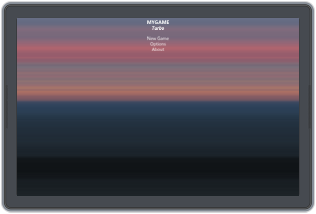
|
Or if you scaled up sizes and positions, but your font/images are too small bitmaps... Up-scaled image looks fuzzy and out of focus. 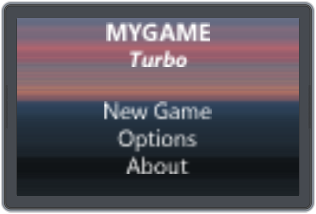
|
→ |
What you want.. Resolution independent sizes and positions with text in the correct size in any resolution. 
|
Example 2:
What can happen if you design for large screens (hi-res/hi-dpi desktop or tablet) first and then move over to small screen (hi-dpi/lo-dpi phone).
|
Starting point: For example, handcrafted layout for HI-RES tablet or desktop. 
|
→ |
If you worked with absolute sizes... |
→ |
What you want.. Resolution independent sizes and positions with text in the correct size in any resolution. 
|
||
|
On HI-RES/HI-DPI phone content might almost fit: 
|
On LO-RES phone you'd get a tiny cropped area: 
|
|||||
Real-World Example
BESIEGE by Spiderling Games
- BESIEGE by Spiderling Games uses Pixel-Perfect Dynamic Text for sharp, readable in-world text across all resolutions.
Get Support
How to get help
- Community Support: Post to the Unity Discussions Thread for generic issues and community discussion
- Bug Reports: Send email for bugs or test cases. Contact by email:
contact@strobotnik.com
Support is provided through bug reports and feature requests, which may be addressed in future releases.
Version History
NOTE: We strive to release updates only when they matter, not for sake of updating.

// 2024-03-17, 1.2.5
- Fixed warning for Unity 2023+.
- Verified support for Unity 6.

// 2019-11-16, 1.2.4
- For Unity 2019.3+: Support for Enter Play Mode without Domain/Scene Reload.
- Removed GUILayer components to fix a warning.

// 2019-04-16, 1.2.3
- Minor changes to fix Unity 2018.3 & Unity 2019.1 compatibility.

// 2018-04-22, 1.2.2
- Minor fix for latest Unity 2017 & 2018 deprecation warnings.

// 2017-05-06, 1.2.1
- Fixed issues related to text reverting when enabling&disabling.
- Tested Unity 2017 compatibility.

// 2017-04-06, 1.2.0
- Fix for combination of DirectX9 and Unity versions 5.5 or newer.

// 2015-08-11, 1.1.0
- Support for Unity 5 added.

// 2015-02-17, 1.0.6
- Modified initialization to prevent doing it many times.
- Fixed a mesh memory leak.
- Fixed error case when Camera rect size is zero (can occur momentarily when starting Unity with autoloaded scene).
- Don't snap if transform lossyScale (XY) is zero.
- Added autoFaceCam checkbox which keeps text auto-oriented text towards given camera (like a billboard).
- Preliminary support for Unity 5 (compatibility for auto-upgrading dll).

// 2014-09-23, 1.0.5
- Fix: In some cases SetText didn't work properly when called from Start().
- Added automatic fallback to smaller font pixel sizes in case of font atlas rebuild loop (due to low memory or using too large text).
- Can suppress debug logging by setting dt.suppressDebugLogs=true from script code.

// 2014-08-05, 1.0.4
- Added new feature: Letter Spacing (relative to selected text size).
- Fix: GetText returned empty string for game objects which were disabled when loading the scene (and had a DT component). This resulted in custom inspector clearing text in editor when viewing such objects.

// 2014-07-04, 1.0.3
- Overall better performance and robustness.
- Fixed problem when internal sampling setting might be out of sync until toggling "Use Direct3D 11" in Player Settings.
- Metrics are now updated when switching font (fixes incorrect change in position).
- New "Auto Set Font Material" checkbox to control overwriting renderer.sharedMaterial.
- Added example of how to dynamically create DT prefabs aligned after each other.
- Default font is now automatically set when creating a new dynamic text object from code and leaving font as null (worked previously only in editor like this).
- Added custom inspector which indicates more clearly if camera or font reference is missing.
- Fix for changing text from script code in Start().
- Removed need for deferred mesh generation (must have proper camera & font).
- Direct text string access replaced with SetText and GetText methods.
- Fixes for Windows Store and Windows Phone 8 support.

// 2014-03-09, 1.0.2
- Added support for using a StringBuilder (textSB field).

// 2014-03-04, 1.0.1
- Fixed an unnecessary allocation when reusing mesh arrays.

// 2014-02-16, 1.0.0
- Initial version.